/Store design and redesign
We measured 19 Shopify stores. Apps were not the problem
August 5, 2026 · WOCX
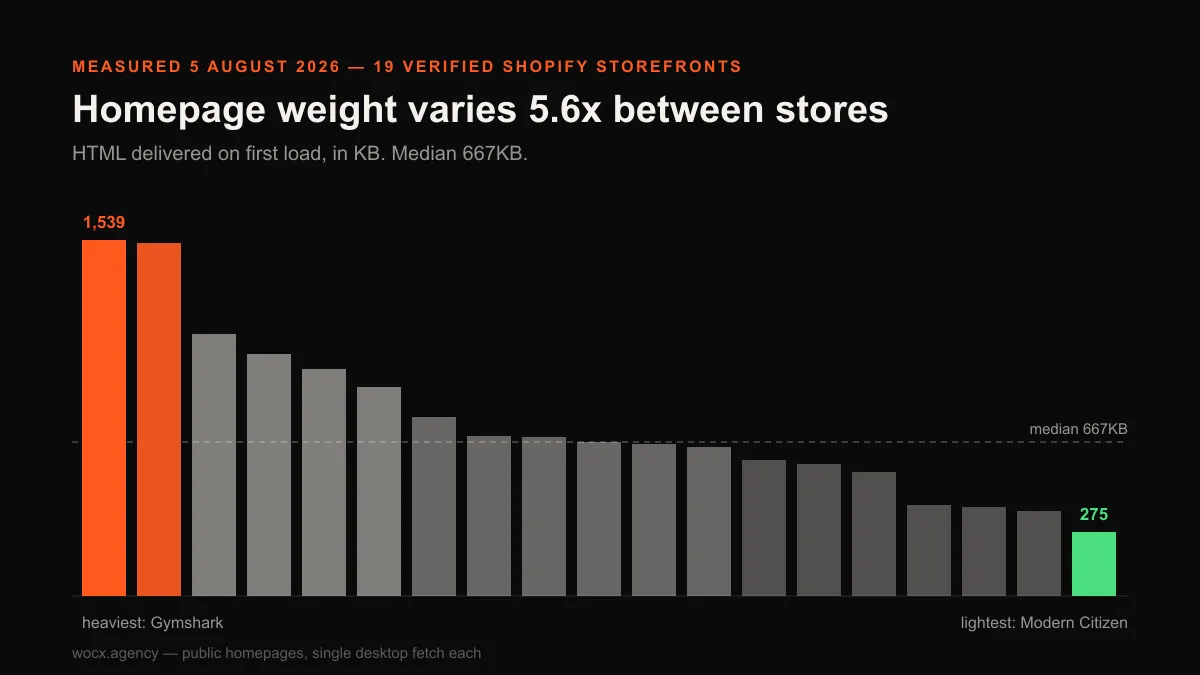
We fetched 19 real Shopify storefronts on 5 August 2026 and measured what each one actually sends to a browser. Not what the owners say they run, not what a vendor claims about page weight, just the HTML that arrives when you open the homepage. The headline result was not the one we expected, and it argues against something we have written ourselves.
Homepage weight ranged from 275KB to 1,539KB. That is a 5.6x spread between stores on the same platform, selling similar things, to similar people. The median landed at 667KB. But the interesting part is what did not explain the difference: the number of apps a store was running had essentially no relationship to how heavy its homepage was. The correlation came out at −0.03, which in plain terms means none.
What we measured, and what that limits
Each store’s public homepage was fetched once with a desktop browser user agent, and every candidate was checked for Shopify storefront signatures before it counted, so nothing entered the sample on the strength of a brand name or a listicle claiming it runs Shopify. Five candidates were excluded, and we are naming that rather than quietly reporting 19 as though it were the whole list: two failed to respond at all, one timed out, one returned a rate-limit error, and one turned out not to be running Shopify despite being widely described as though it does. That last exclusion is the reason the verification step exists. A panel that silently drops what it cannot reach produces statistics that are quietly wrong, and the failures are usually not random. Slow or aggressively protected sites are exactly the ones most likely to drop out, which biases whatever survives.
The limits matter as much as the numbers. This is one homepage per store, fetched once, on one day. It is not a Lighthouse score, it does not measure what a real visitor on a phone experiences, and it says nothing about product or collection pages. We have since run the same measurement on 15 real Shopify product pages, which is the page paid traffic actually lands on. App detection is client-side only, which means we can see a tool if it injects something into the page and cannot see it otherwise. Our own experience auditing stores puts the typical count nearer 15 apps than the 4 we could detect, so treat the app figures as a floor rather than a count.
The result that undercuts a popular argument
There is a well-worn line in Shopify content, and we have used it ourselves more than once: apps are what make your store slow, so strip them out and replace them with native code. It sounds obviously true, and the logic is clean enough that almost nobody checks it. Every app adds a script, scripts cost time to fetch and execute, therefore fewer apps must mean a faster store. It is the kind of argument that survives because it is repeated by people who benefit from it being true, ourselves included, and because testing it requires measuring stores rather than reasoning about them. So we measured, expecting to confirm what we had already written, and got the opposite.
The data does not support it. Plotting app count against homepage weight across the panel produces a cloud with no shape to it. The Pearson correlation is −0.03, which is statistical noise, not a relationship. Worse for the argument, the extremes point the wrong way. The heaviest homepage we measured, at 1,539KB, was running the fewest detectable apps of any store in the sample: two. The store carrying the most apps we could find, nine of them, delivered a homepage of 535KB, comfortably below the median.
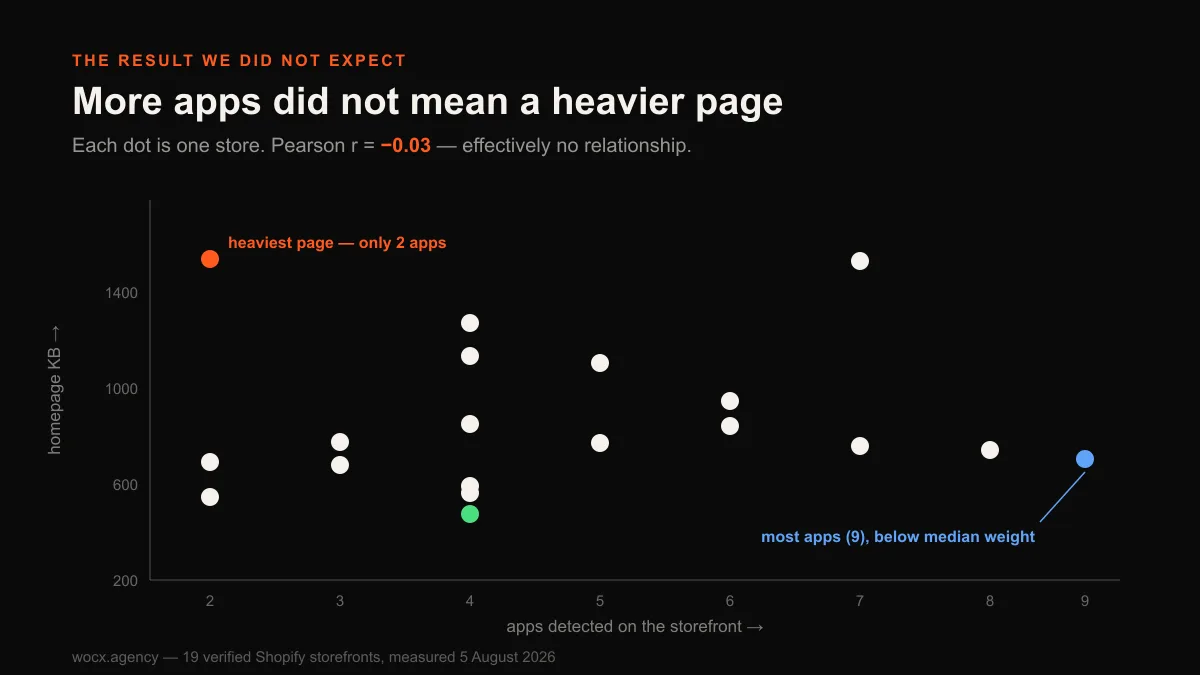
We are publishing this even though it weakens a case we have previously made, because the alternative is pretending we did not look. With 19 stores this is a small sample and a single correlation is not proof of anything universal. What it is enough to do is undermine the confident version of the claim. If apps were the dominant driver of page weight, 19 stores would not produce a flat line.
Then what does drive the difference?
Look at what actually varies across the panel and the answer stops being subtle. Script counts ran from 15 to 126 on a single homepage, an 8x spread, with a median of 77 and half of all stores sitting between 53 and 98. Third-party script hosts, meaning distinct external domains a browser has to connect to, clustered much tighter at a median of 5. But neither number tracked weight. Gymshark ships 15 scripts and 1,539KB of HTML. Hello Tushy ships 120 scripts and 535KB. One store loads eight times as many scripts as the other and sends barely a third of the bytes, which should be enough on its own to retire script-counting as a diagnostic.
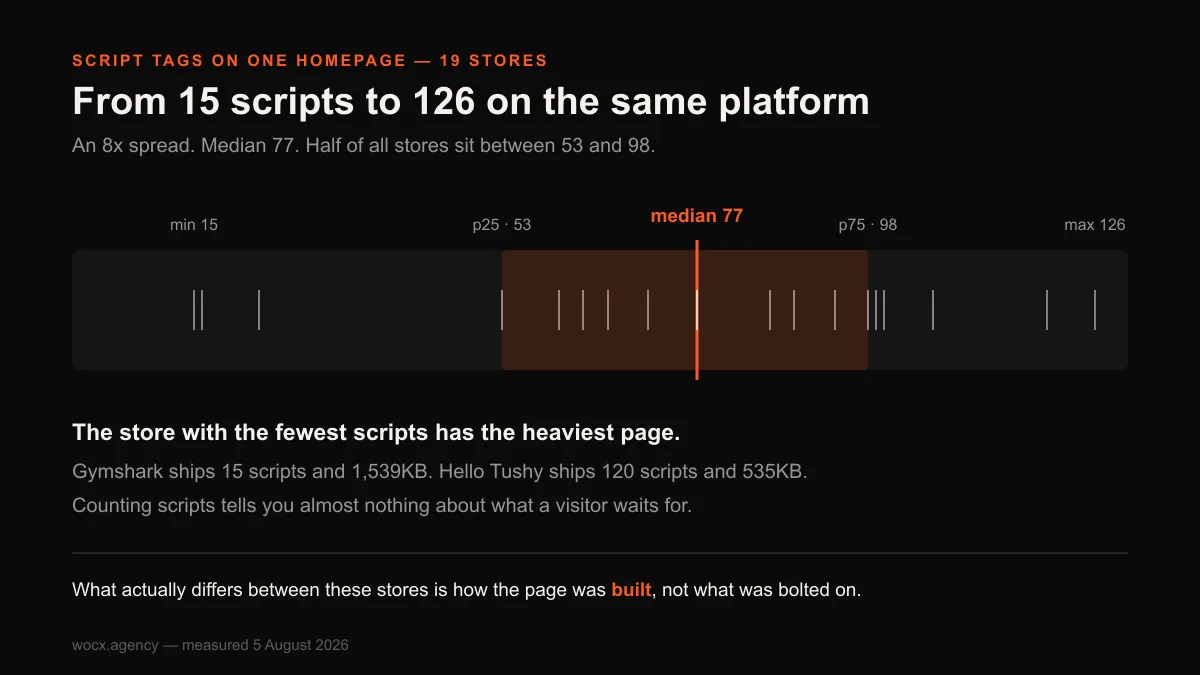
What separates a 275KB homepage from a 1,539KB one is the page itself: how much markup the theme generates, how many products and images are pushed into the initial HTML, whether content below the fold is deferred or shipped up front, and how much inline styling and duplicated structure the build carries. These are decisions taken when the store is designed and built, not decisions taken in the app store. A heavy theme with three apps will lose to a lean theme with nine, every time.
That reframes the practical advice. Auditing your apps is cheap and occasionally worth it, but it is rarely where the weight is. If a store feels slow, the build is the first place to look, not the app list.
What stores are actually running
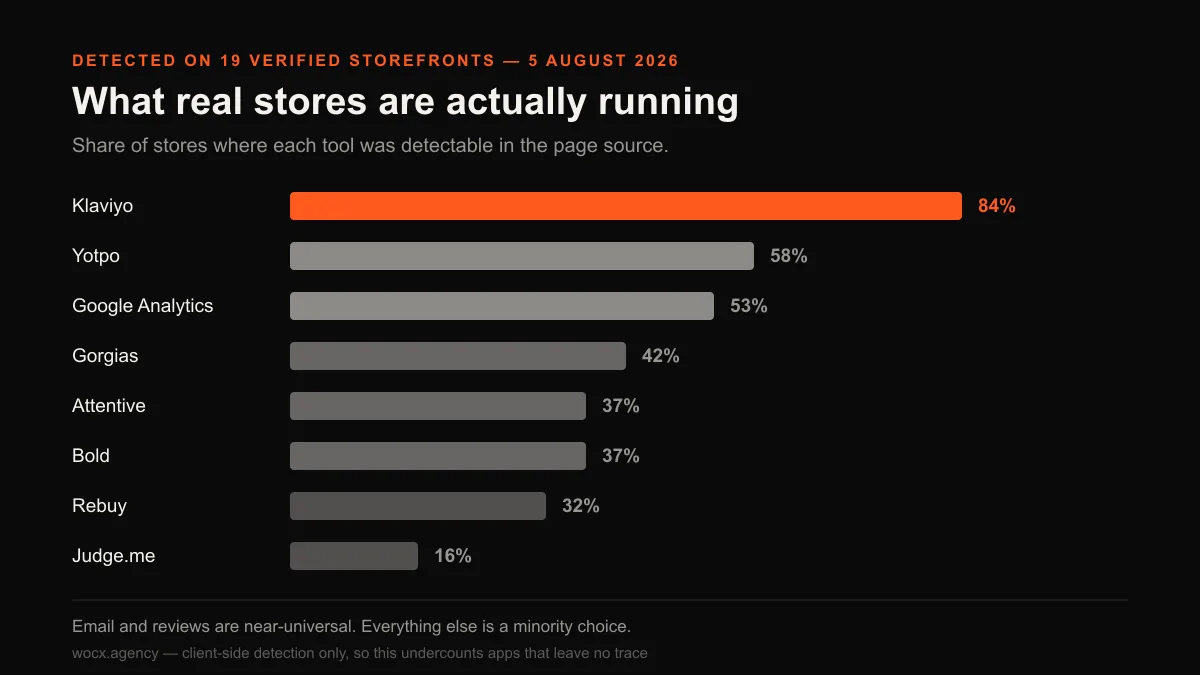
The app data is more useful as a picture of what real merchants have settled on than as an explanation of performance. Two categories are close to universal, and everything else is a minority choice.
| Tool | Stores | Share of panel |
|---|---|---|
| Klaviyo | 16 of 19 | 84% |
| Yotpo | 11 of 19 | 58% |
| Google Analytics | 10 of 19 | 53% |
| Gorgias | 8 of 19 | 42% |
| Attentive | 7 of 19 | 37% |
| Bold | 7 of 19 | 37% |
| Rebuy | 6 of 19 | 32% |
| Judge.me | 3 of 19 | 16% |
Email is effectively settled: 84% of the panel runs Klaviyo, and once you add Attentive and Postscript for SMS, almost every store has a dedicated messaging stack. Reviews are the second near-universal category, though the market is split rather than won. Beyond those two, adoption falls away quickly, which is worth knowing if you are deciding whether some category of app is table stakes. Mostly it is not.
Where the weight actually sits
If neither apps nor scripts explain a 5.6x spread, it is worth being specific about what does, because “it’s the build” is only useful if you can name the parts. Four things showed up repeatedly when we looked at the heavy end of the panel, and all four are decisions made during design and development rather than afterwards.
The first is how much of the page arrives before anyone asks for it. A homepage that ships every product card, every collection tile and every footer link as markup in the initial response is doing work the visitor may never need. The second is inline styling: several of the heavier stores carried large blocks of CSS embedded directly in the document, sometimes repeated per section, which is convenient for a theme builder and expensive for everyone loading the page. The third is duplication, where the same content exists two or three times in the HTML to support different breakpoints instead of one structure that adapts. The fourth is images pushed into the initial HTML rather than deferred, and here the panel was mostly well-behaved: 17 of the 19 stores used lazy loading somewhere on the page, which suggests this particular lesson has landed.
None of those four are fixed by uninstalling anything. They are fixed by changing how the page is built, which is slower and less satisfying advice than “remove three apps”, and considerably more likely to work.
The thing nobody is checking
One number surprised us more than the weight spread. Across the panel we counted 1,491 images on these 19 homepages, and 110 of them carried no alt text at all. Ten of the 19 stores, more than half, had at least one image with nothing describing it.
That is not a performance problem, it is a visibility one. An image with no alt text cannot appear in Google Images, cannot be understood by an AI answer engine summarising the page, and is announced as nothing at all to a shopper using a screen reader. On a store where product photography is doing most of the selling, that is a strange thing to leave on the floor. It is also close to free to fix, which is what makes it worth mentioning: unlike page weight, it needs no rebuild, no trade-off and no decision about what to sacrifice.
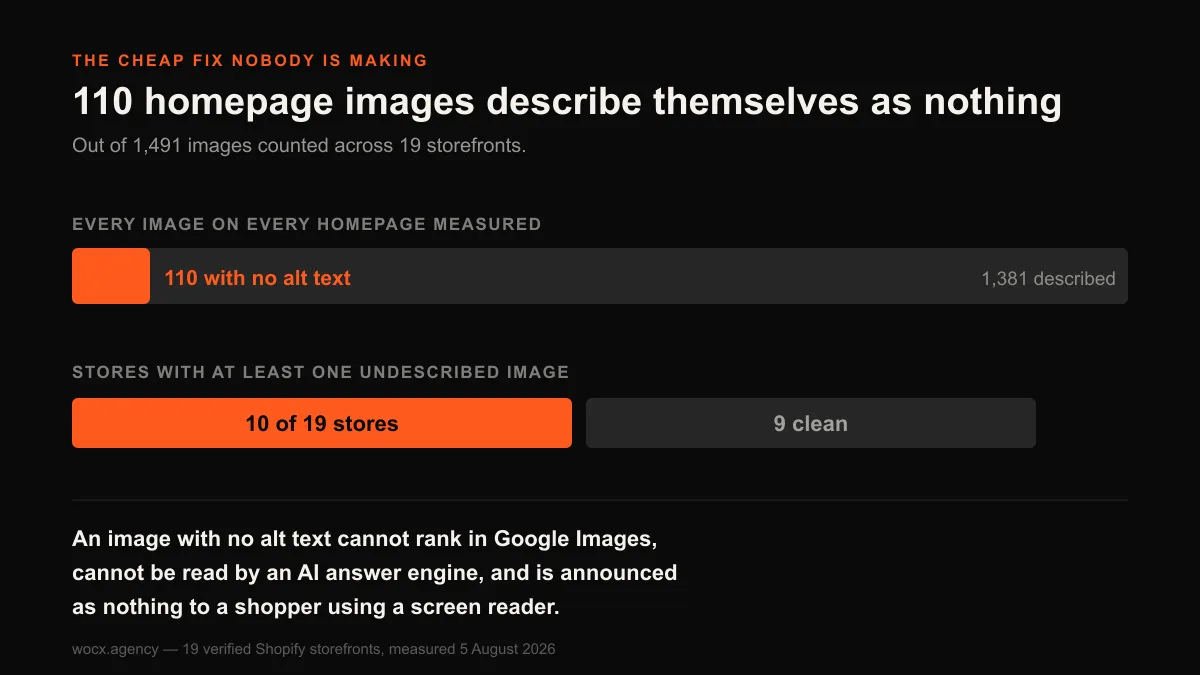
Worth saying plainly: a missing alt attribute is not always a mistake. A purely decorative image is correctly marked with an empty alt so screen readers skip it rather than announcing noise. What we counted here is images carrying no alt attribute at all, which is a different thing and is never deliberate.
What this changes about how we advise people
We build and rebuild Shopify stores, so this result lands on our own advice rather than someone else’s. The version of the pitch we have used, and that most of this industry uses, is that a store is slow because it is carrying too many apps, and the fix is to replace them with custom code. This panel says that framing is mostly wrong, and it is worth being direct about what replaces it.
If a store feels slow, the first place to look is what the homepage ships before a visitor has asked for anything. That is a build question. It is answered by looking at the theme’s markup, at how much content is rendered up front, at whether sections are duplicated for different screen sizes, and at how much styling is inlined into the document. Those are the things that separated the 275KB store from the 1,539KB one, and none of them appear in an app list.
That does not make app audits worthless. A single badly-written app can absolutely wreck a page, and paying for a tool nobody uses is worth catching. But it does mean an app audit is a small job with a small payoff, not the main event. Anyone selling it as the answer to a slow store, including us when we have leaned on it, is pointing at the wrong thing.
The corollary is more encouraging than it sounds. Page weight is not something a store accumulates helplessly through a decade of installs. It is a set of decisions taken during design and build, which means it can be decided differently, and a redesign that takes those decisions deliberately gets a lighter store as a consequence rather than as a separate optimisation project. Weight is only one of the signals worth checking, though. If you are weighing up whether your store needs a rebuild at all, we set out seven signals that tell you whether to fix or redesign, four of which you can measure yourself.
How to check your own store against this panel
None of this requires a tool or a subscription. You can put your own store on this chart in about two minutes, and the reason to do it yourself rather than run a scoring service is that you find out which specific thing is heavy rather than receiving a grade.
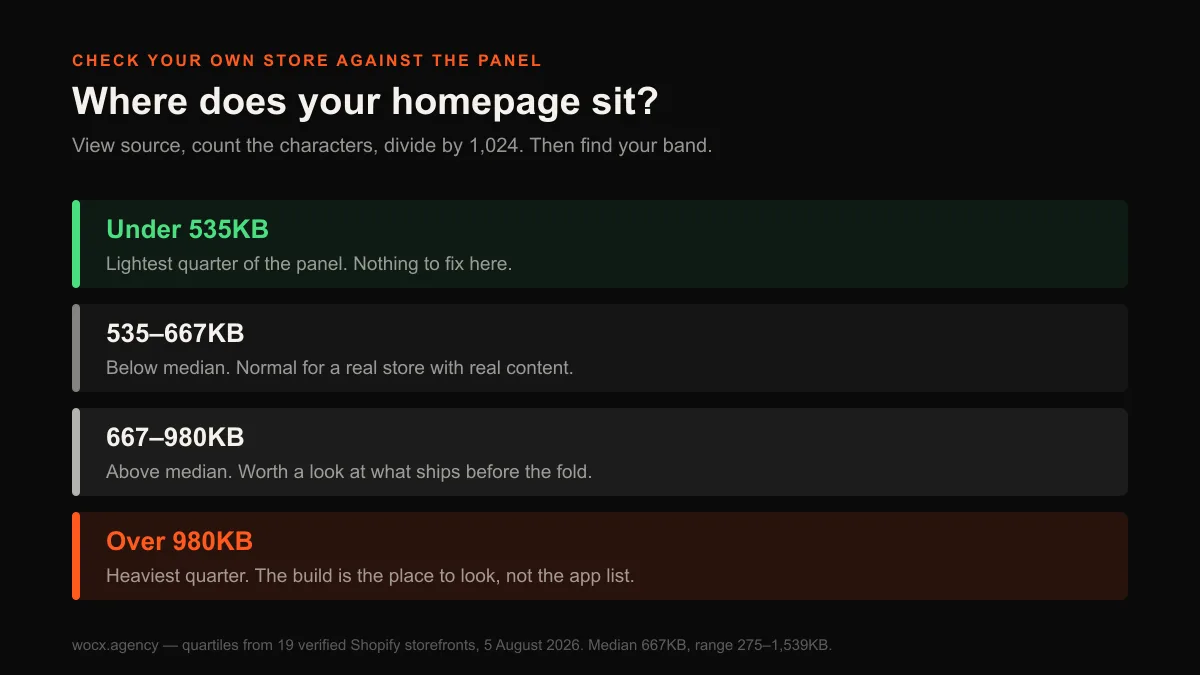
Open your homepage, right-click, and choose view source. Select all of it and paste it somewhere that counts characters, then divide by 1,024 for the KB figure to compare against the 667KB median here. If you land above roughly 980KB you are in the heaviest quarter of this panel, and if you land under 535KB you are in the lightest quarter. That single number will tell you more than most audits.
For the script count, search the source for <script and read the match total. The median here was 77, with half of all stores between 53 and 98. Treat a high number as a prompt to look rather than a problem in itself, because the panel is clear that script count and weight are barely related. What is worth checking is how many different external domains your page reaches for, since each one costs a fresh connection before anything downloads. The median across these stores was 5.
For the alt-text check, search the source for <img and compare that total against a search for alt=. If the second number is meaningfully smaller than the first, you have images no search engine and no screen reader can interpret. This is the one finding in this study we would act on immediately, because it costs nothing and there is no argument against fixing it.
What none of this tells you is what a real visitor on a mid-range phone actually experiences, which depends on connection speed, image delivery and what runs before the page becomes usable. HTML weight is a strong proxy and a poor substitute. If the number comes back bad, that is the point to measure properly rather than the point to start deleting things.
What we would actually do with a store like these
The panel is a useful reality check on where effort goes. Most of the stores measured here are established brands with real budgets, and their homepages still range from lean to enormous, with no relationship to how many tools they have installed.
| If you are worried about | Look at | Not at |
|---|---|---|
| Page weight | Theme markup, images in the initial HTML, deferred content | Your app count |
| Slow feel on mobile | What renders above the fold before anything else loads | Script totals |
| Images not in search | Alt text and file naming | Image compression alone |
| Rising app spend | Which apps you actually use, priced against order volume | Whether apps are “bad” |
The honest summary is that a store’s speed and its app list are largely separate problems, and conflating them sends people to fix the wrong one. The stores at the light end of this panel did not get there by running fewer apps. They got there because someone made deliberate decisions about what the page ships before a visitor asks for anything.
FAQ
Do Shopify apps slow down your store?
Not as much as the common advice implies. Across 19 real storefronts we found a correlation of −0.03 between the number of detectable apps and homepage weight, which is effectively no relationship. The heaviest homepage in the panel ran the fewest apps. Individual badly-built apps can certainly hurt, but “apps” as a category did not predict weight.
How heavy is a typical Shopify homepage?
In this panel the median was 667KB of HTML, with a range from 275KB to 1,539KB. That is a 5.6x spread between stores on the same platform. Half the stores sat between roughly 535KB and 980KB. This measures the HTML document only, not images, fonts or scripts downloaded afterwards.
How many apps does a typical Shopify store run?
We could detect a median of 4 per storefront, ranging from 2 to 9. That is a floor rather than a true count: apps are only visible to this method if they inject something into the page, and plenty do not. From auditing stores directly, the real figure is usually nearer 15.
What is the most common Shopify app?
Klaviyo, on 84% of the stores we measured. Reviews were the second most established category, led by Yotpo at 58%. After email and reviews, adoption drops off sharply, so most app categories are a genuine choice rather than something every store has.
Does script count tell you if a store is fast?
Almost nothing. One store in the panel shipped 15 scripts and the heaviest page we measured. Another shipped 120 scripts and a page a third of the size. Script counts are easy to measure and easy to quote, which is probably why they get used, but they did not track page weight here.
Want to know which of these your store is actually doing? Send me the URL and I will measure it against this panel and tell you where it sits. Free, no obligation, usually a reply within the hour.