/Landing pages and funnels
Shopify landing pages: what 15 real brands actually do
August 7, 2026 · WOCX
If you are sending paid traffic to a Shopify page, that page is doing a job your homepage never has to do. Someone clicked an ad and arrived cold. They will decide in a few seconds whether you are worth their money. Most advice about that page is written from opinion, so you get confident lists of things you “must” have with nothing behind them.
We took a different route. We fetched the product pages of 15 established Shopify brands, the kind that spend real money on ads, and counted what is actually on them. Not what anyone recommends. What the pages that are already winning genuinely contain, and which supposedly essential tactics almost nobody uses.
One thing is worth saying before any number. The first version of this study was wrong, and we caught it before publishing. The tool that measured these pages had picked up gift cards instead of products on a third of the stores. On one store it wandered off the site entirely and measured an unrelated third-party website, because that site’s address happened to contain the word “products”. And several of its checks were matching words buried in code that no shopper would ever see. Everything below is from the rebuilt version. The section near the end on what we could not measure is there because we needed it ourselves.
What we measured, and what that does not cover
For each of 15 verified Shopify stores we found a real product URL on the store’s own pages instead of guessing one. Each was fetched three times, and the middle copy is what we measured. Three fetches, not one, because a store running personalisation serves a different page each time you ask: one brand here varied by 281KB across three consecutive requests, and three others drifted by 3KB or less while the remaining eleven came back byte-identical. A single fetch would have published whichever draw we happened to get. Four stores dropped out and are named at the end, because a panel that quietly discards what it cannot reach produces statistics that are wrong in a direction nobody can see.
The limits matter as much as the findings. Everything here is read from the page’s code, which means anything drawn in afterwards by JavaScript is invisible to us. That is not a small caveat, and it rules out a whole category of things you might expect us to have counted. A page containing an element is also not proof that the element is why the brand sells well. Treat all of this as evidence of what experienced teams have converged on, not as a formula you can copy into a template.
The only thing every brand does
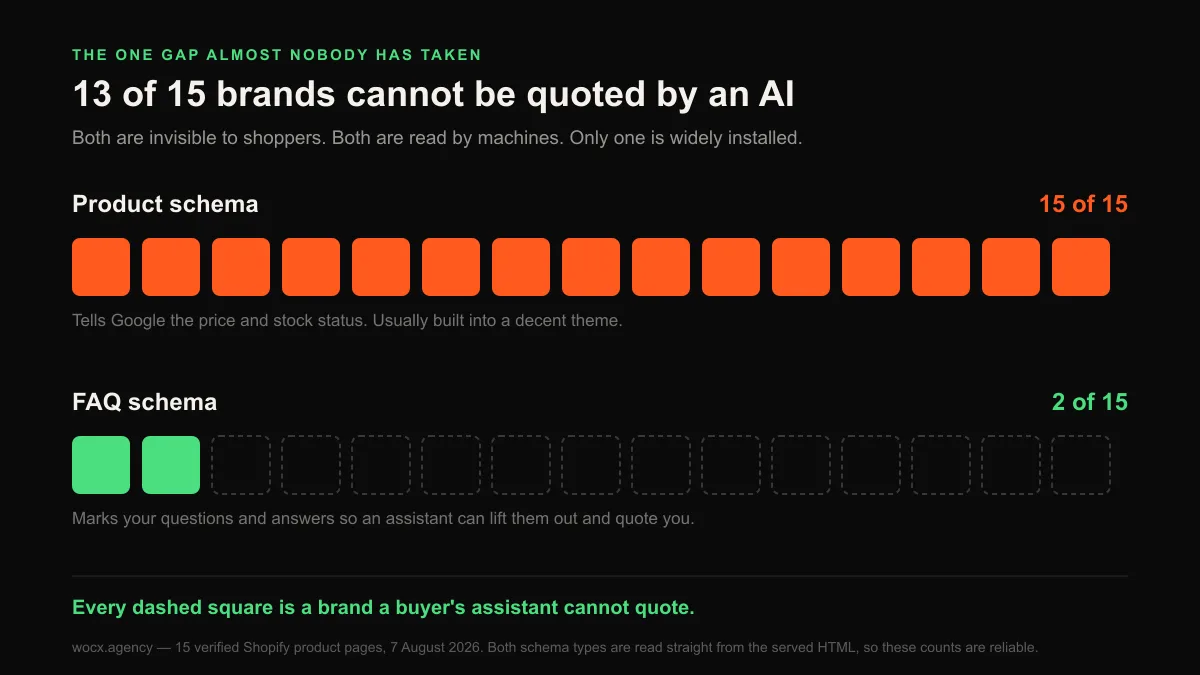
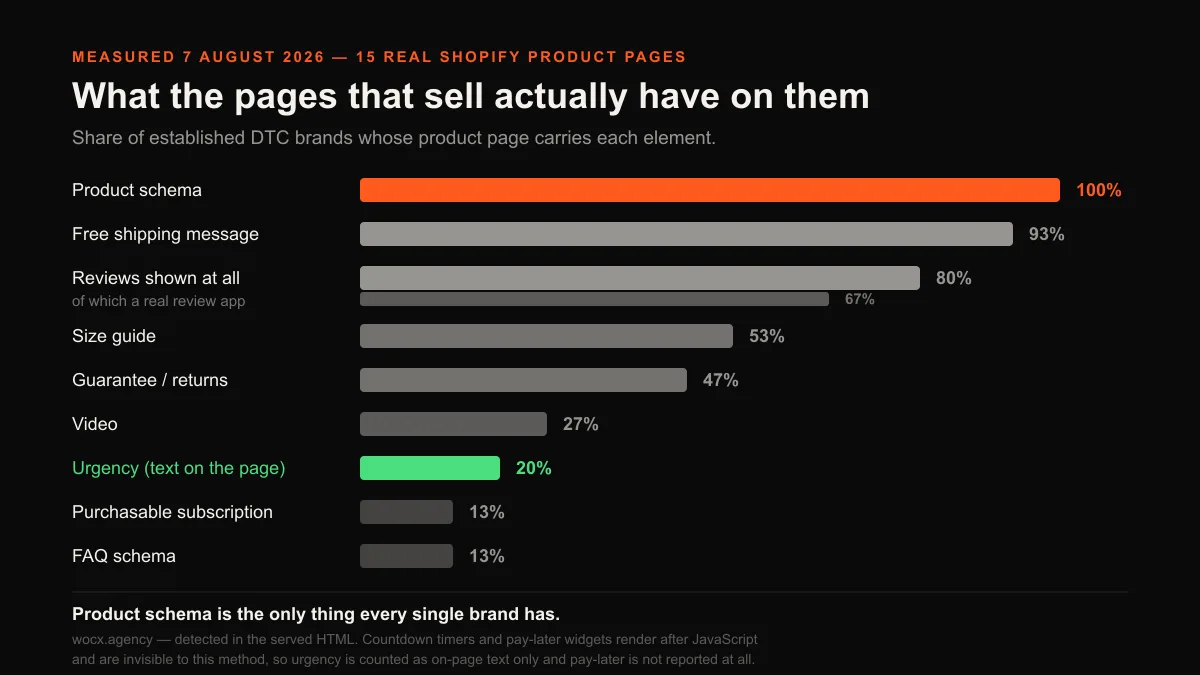
Just one element appeared on all 15 pages, and it is not the one most people would guess. Product schema: 15 of 15.
This is invisible to shoppers. It is a block of code that tells Google what the page is: the product, the price, whether it is in stock. It is why some results in Google show a price and a star rating while others show a plain blue link. Most decent themes build it in, so you are unlikely to be adding it by hand. That also means its absence signals something wrong with your build, and it belongs on a developer’s list, not a marketing one.
Free shipping messaging came second, on 14 of 15 pages. Notable because it is a message, not a feature. Shipping cost is the single most common reason a cart gets abandoned, and these brands are answering it before the buyer has to go looking.
Reviews are not the universal law you were told
Reviews are usually presented as the one thing no store can go without, so this is where we expected a clean sweep. We did not get one, and the shape of the miss is more interesting than a single percentage would be.
Twelve of the fifteen pages show reviews in some form, 80%. But only 10 of 15 are running an actual review platform, 67%. The other two carry nothing but a rating number tucked into their page code, with no review app loading at all. If you are choosing between the platforms the ten are running, we compared the best Shopify review apps on real prices and placement. Three brands have neither: Chubbies, Olipop and Death Wish Coffee, all of them established businesses spending real money on traffic.
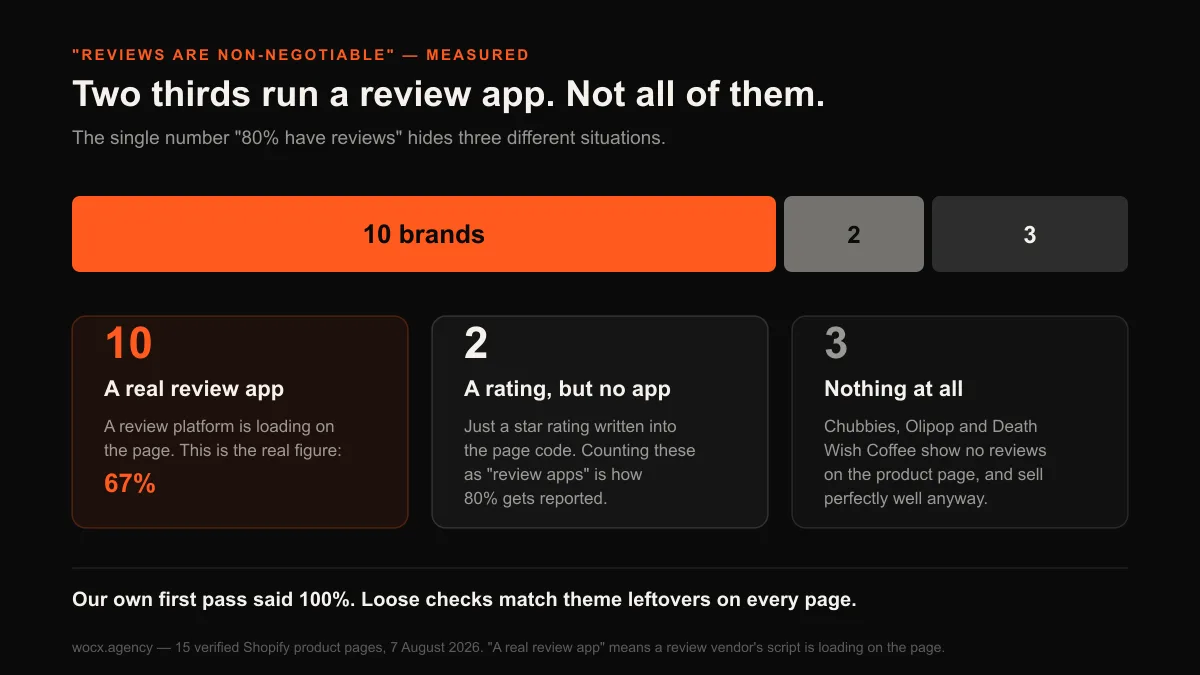
That split is worth separating carefully, because collapsing it is how a study like this goes wrong. Our first pass reported reviews at 100%, and the figure was rubbish. Most Shopify themes leave review-related code lying around whether or not a store has any reviews, so a loose check matches every page and declares a clean sweep. On one brand the match came from a styling rule sitting in a stylesheet. On another it came from a loyalty-points tool made by a review company, which is a different product entirely. Requiring a real review platform to be loading dropped the count from fifteen to ten.
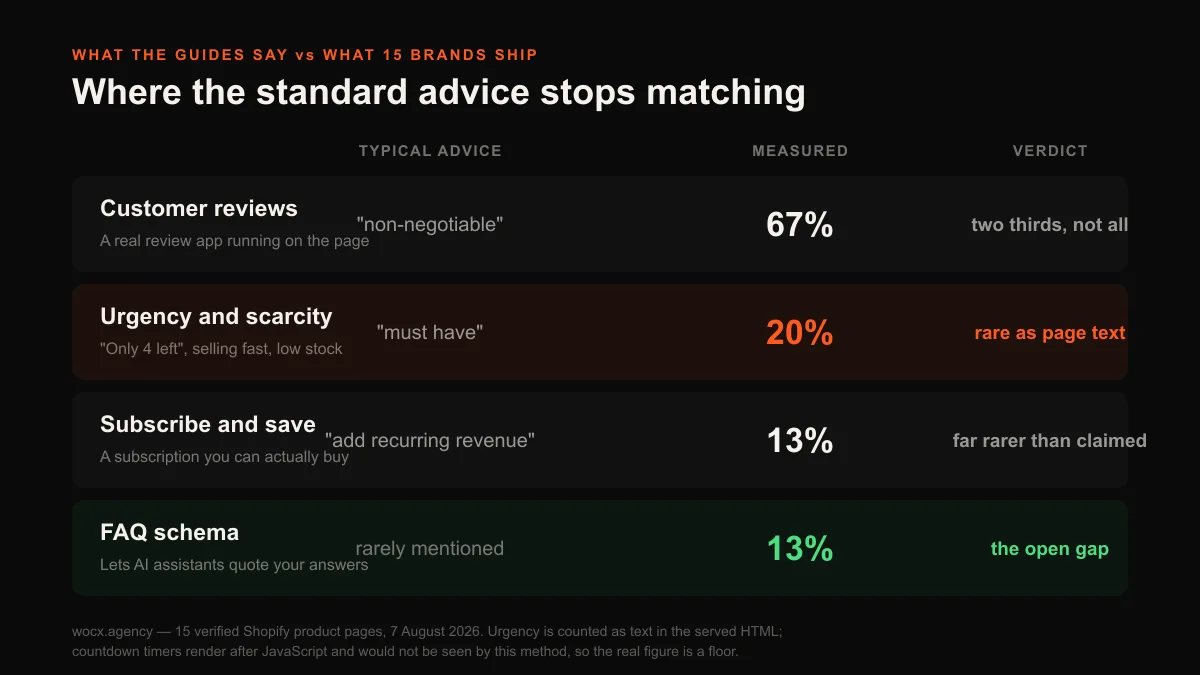
So the honest version of the advice is narrower than the one you usually get: two thirds of brands at this level run a review app, four in five show ratings somehow, and a handful sell perfectly well without either.
The result that contradicts standard advice
Scarcity messaging appeared as text on only 3 of the 15 pages, 20%. If you have read much about ecommerce conversion, you have been told repeatedly that urgency is essential: countdown timers, “only 4 left in stock”, “12 people are viewing this right now”. It is among the most confidently repeated tactics in the category, and in dropshipping content it is close to a religion.
We have to be careful about what this proves, more careful than we would like. Our method reads the page’s code, and a countdown timer is almost always drawn in afterwards by an app, which means we would not see it. So the honest statement is narrower than the headline: four in five of these brands do not put scarcity language in the page itself. Some of the remainder may well be running timers we cannot detect. Read 20% as a floor, not a ceiling.
Even narrowed, it is worth something. Putting “only 4 left” in your page text is free and requires no app at all, and most brands at this level have chosen not to. There is a plausible reason, and it comes down to who you are trying to be. Fake scarcity is now widely recognised by shoppers. A countdown that resets when you reload the page reads as a trick, and a brand that wants to be trusted for years does not want to look like a store trying to close you inside the next ninety seconds. For a one-off dropshipping product that calculation might genuinely be different. For a brand, the trade against credibility appears to be one that most are not willing to make.
Subscriptions are far rarer than anyone admits
Of the fifteen brands, only two sell a subscription a customer can actually put in their basket. That is 13%, against the 80% our first pass reported, and the gap between those two numbers is worth explaining because the same mistake is almost certainly sitting inside other people’s research.
Shopify announces on nearly every store that the platform supports subscriptions. That announcement lives in the page’s code regardless of whether the store sells a single thing on a recurring basis. A check looking for the word “subscription” finds it every time and reports a market where four in five brands sell subscriptions. Add newsletter signup forms, which also contain the word subscribe, and the number climbs further. When we changed the check to look for a subscription a customer could genuinely put in their basket, it fell from twelve brands to two.
If you have been told that recurring revenue is table stakes and you should feel behind for not offering it, the market disagrees with that framing. Among established brands selling the kind of products these do, an actual purchasable subscription is unusual.
| Element | Brands with it | Read this as |
|---|---|---|
| Product schema | 15 of 15 (100%) | Should already be in your theme |
| Free shipping message | 14 of 15 (93%) | Answer it before they ask |
| Reviews shown at all | 12 of 15 (80%) | Ratings visible in some form |
| A real review app running | 10 of 15 (67%) | Two thirds, not the universal law |
| Size guide | 8 of 15 (53%) | Near-universal for apparel, rare elsewhere |
| Guarantee / returns | 7 of 15 (47%) | A genuine decision, evenly split |
| Video | 4 of 15 (27%) | A choice, not a default |
| Urgency text on page | 3 of 15 (20%) | Most brands decline it |
| Purchasable subscription | 2 of 15 (13%) | Far rarer than the advice suggests |
| FAQ schema | 2 of 15 (13%) | The clearest open gap |
The gap nobody has taken
One number stands out for being low in a way you can act on this week. FAQ schema appeared on only 2 of 15 pages, 13%.
FAQ schema is code that marks up your questions and answers so search engines and AI assistants can read them directly. It is not the same as having an FAQ section visible on the page, which is about the shopper. This is about the machines that decide what to show and what to quote. Unlike most of what we measured, this count is completely reliable, because schema is plain text sitting in the page’s code where anyone can check it.
That matters more now than it did two years ago, because a growing share of buyers ask an AI assistant before they ever reach a search results page, and those systems quote from pages whose answers are structured clearly enough to lift out. A page whose questions are marked up properly is easier to quote than one where the same words sit in an unlabelled block of text.
Only 2 of 15 established brands have done this. It costs nothing beyond the work of adding it. Most themes will not do it for you, and almost nobody in this market has bothered. If you want something to do that your competitors have not, that is where the space is.
How much markup should the page ship?
Here is exactly what we measured, stated before any number so you can judge what it is worth: the size of the HTML document, which is the markup your theme generates before a single photo or script arrives. It tells you how much structure the page is carrying. It is not a load time. It is not what your visitor waits for either, and anyone quoting a figure like this as a speed score is overreaching. Images and scripts are the bulk of what a browser actually downloads, and they arrive separately, so nothing in this section can tell you how fast your page feels.
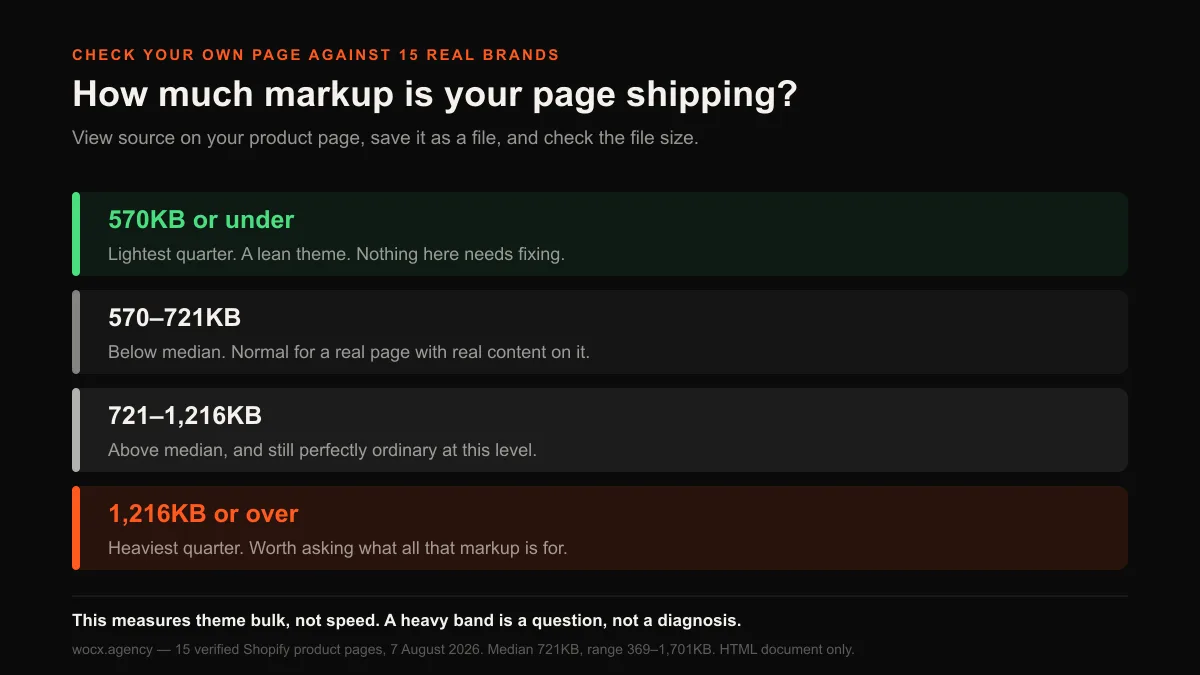
Across the 15 pages the median was 721KB. The lightest quarter came in at or under 570KB and the heaviest at or above 1,216KB, with the range running from 369KB to 1,701KB. That is a 4.6x spread between the leanest and bulkiest theme output, on the same platform, for broadly similar products.
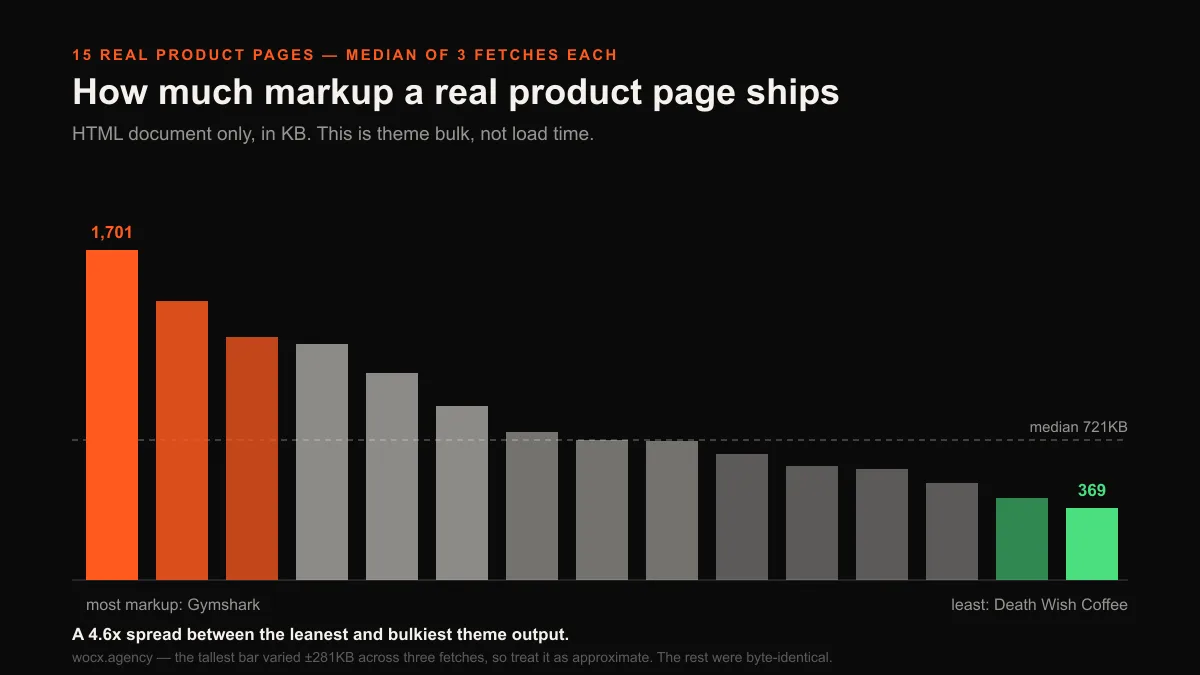
If your page sits in that top band it is worth asking what all that markup is for, and the answer is often duplicated structure, hidden sections that ship on every load, or an app injecting a block of code for a feature you barely use. But sitting in the heaviest quarter tells you where to look, not what is wrong. Gymshark generates the most markup of anything we measured and is not exactly struggling.
The numbers in any audit you can trust, and the ones you cannot
This deserves its own section because it will save you money. If you have ever been sent a free audit by an agency hoping to win your business, it was almost certainly built the way ours was, by reading your page’s code and counting things. That method is genuinely useful for some questions and completely blind to others, and the blindness is never mentioned in the audit.
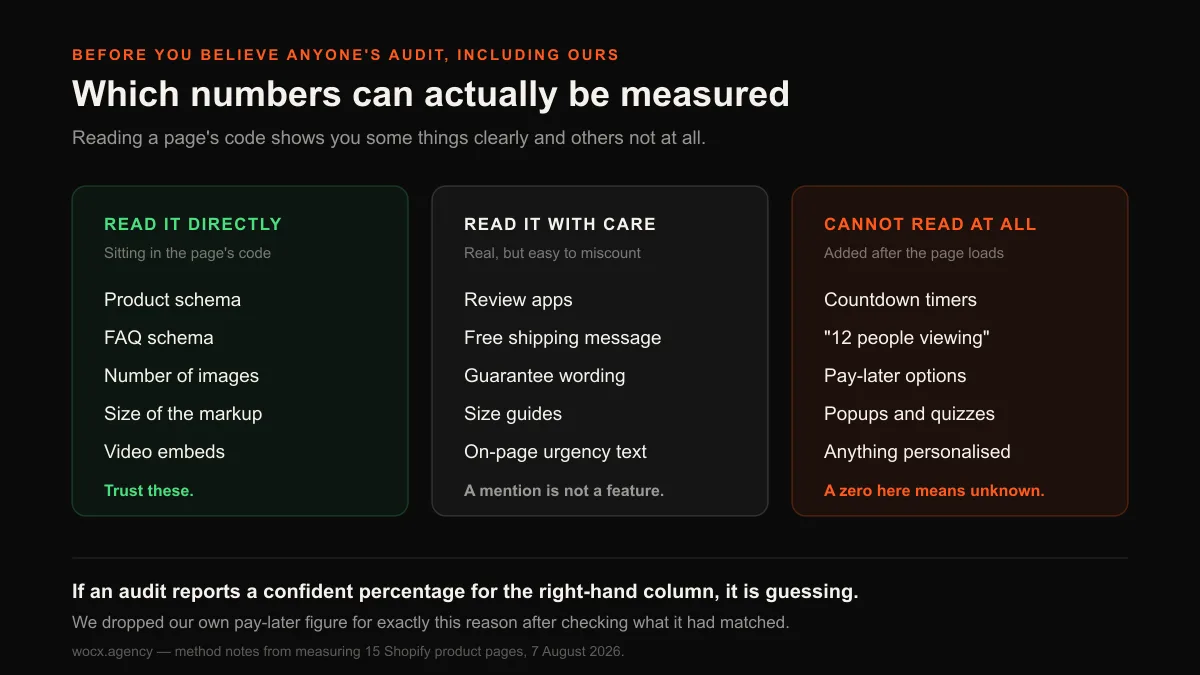
Things sitting in the code can be read exactly: whether you have Product schema, whether you have FAQ schema, how many images the page carries, how much markup it ships. Those numbers are as reliable as a word count.
Things described in words need care. A page mentioning free shipping might be advertising it in the banner or might be linking to a policy explaining that shipping is not free. Our check cannot tell those apart, and neither can anybody else’s.
Then there is a third category that cannot be read at all, and it is bigger than most people realise. Countdown timers, live viewer counters, pay-later options, popups, quizzes and anything personalised are all drawn in after the page arrives. A code-based audit sees none of it.
We ran into this ourselves and it is the reason this section exists. Our first pass reported that 73% of these brands offered pay-later at checkout. When we looked at what had actually matched, one of the strings was “Sign in to an existing account with Shop Pay”, a login prompt rather than an instalment offer. Tightening the check to look for a real instalment widget produced 0%, which is equally false, because Shop Pay Instalments is drawn in after load like everything else in this category. Both numbers were wrong, so we published neither.
| What an audit reports | How reliable it is | Why |
|---|---|---|
| Product schema present | Exact | Plain text in the page’s code |
| FAQ schema present | Exact | Same |
| Image count | Exact | Every image is declared in the code |
| Markup size | Exact, but easy to misread | Real number, though it is not load time |
| Review app running | Good, if checked properly | Themes leave review code lying around |
| Free shipping message | Approximate | A mention is not the same as an offer |
| Guarantee wording | Approximate | Policy links look like promises |
| Countdown timers | Not measurable | Added by an app after the page loads |
| “12 people viewing” | Not measurable | Same |
| Pay later at checkout | Not measurable | Drawn in after load |
The practical lesson: when someone hands you a number about your store, ask how it was measured. A zero often means “we could not see it”, and those two things are very different when you are deciding where to spend.
Images: more than you probably think
Image counts sit in the reliable column, and the result is the most immediately actionable thing in the study. Across the 14 pages we could count, the median was 57 images, with a range from 7 to 245. Six of those fourteen carry a hundred images or more. That is far beyond what most store owners expect, and it makes sense once you see what those images are doing: the product from several angles, the product in use, the product on a person, close enough to see texture, plus everything arriving with the reviews and the payment badges.
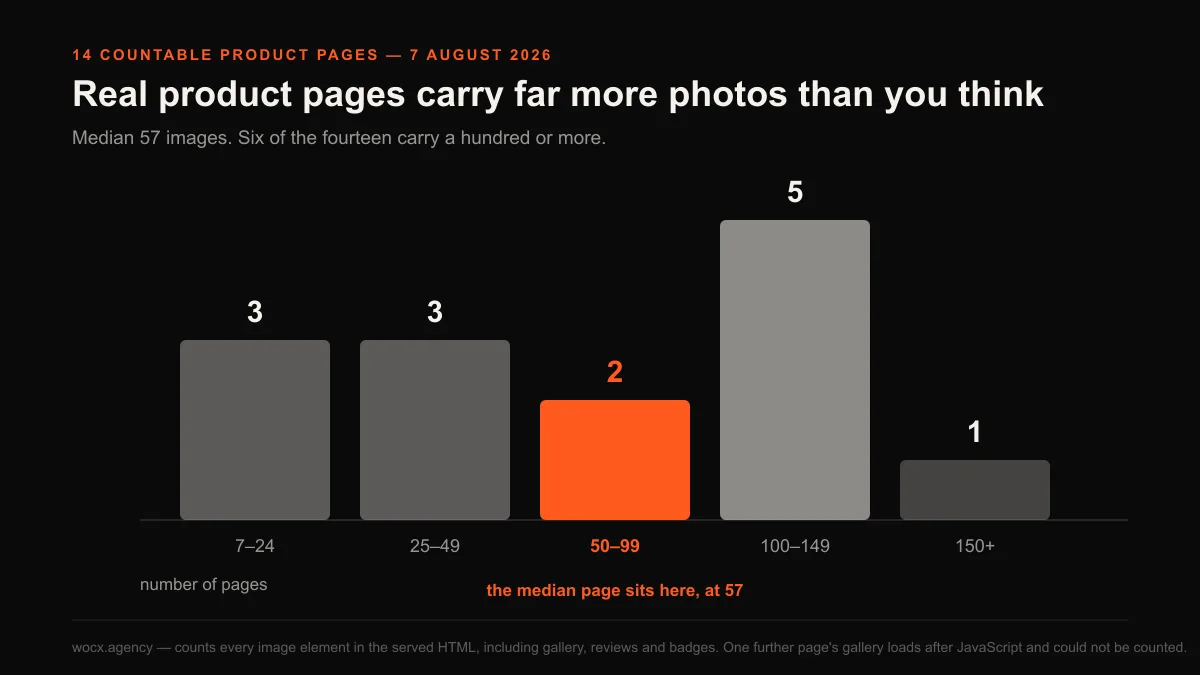
If your page has four images and you are wondering why it does not convert, the answer may be that you have not actually shown the product yet. The buyer cannot pick the thing up and turn it over, so photography is doing the selling. Product photography work is often a better investment than another round of copy edits.
The real requirement is that images are sized properly and loaded lazily, so the ones below the fold do not delay the ones a buyer sees first. That is a build decision, not a content one, and it is invisible in any count of how many images a page has.
Landing page or product page: which do you actually need?
There is a question underneath all of this that most store owners never get a straight answer to, and it decides where you should spend money. Every page in this study is a product page: the standard Shopify template, sitting on your store, doing double duty for organic visitors and paid traffic alike. A dedicated landing page is a separate page built for one campaign and one offer, usually with the navigation stripped out so there is nowhere to go except the buy button. Both can work. They fail in different ways, and the choice between them comes down to traffic volume, not sophistication.
The honest answer for most stores is that your product page is the thing to fix first. It is where your organic traffic already lands. It is what Google indexes. Every improvement you make there compounds across every campaign you ever run. A separate landing page only starts to earn its keep when you are sending enough traffic to one specific offer that the page can be tuned to that audience alone, which in practice means a campaign large enough to produce a clear answer within a couple of weeks. Below that volume you will be guessing, and you will have split your effort across two pages instead of making one genuinely good.
If your product page has correct schema, a shipping answer, reviews and enough photography to sell without you, you have already done more than several of the brands in this study. That is the point at which a dedicated landing page becomes a real lever instead of a distraction.
What to actually do with this
If you are auditing your own page, here is the order the data supports, which is not the order that is easiest to sell you.
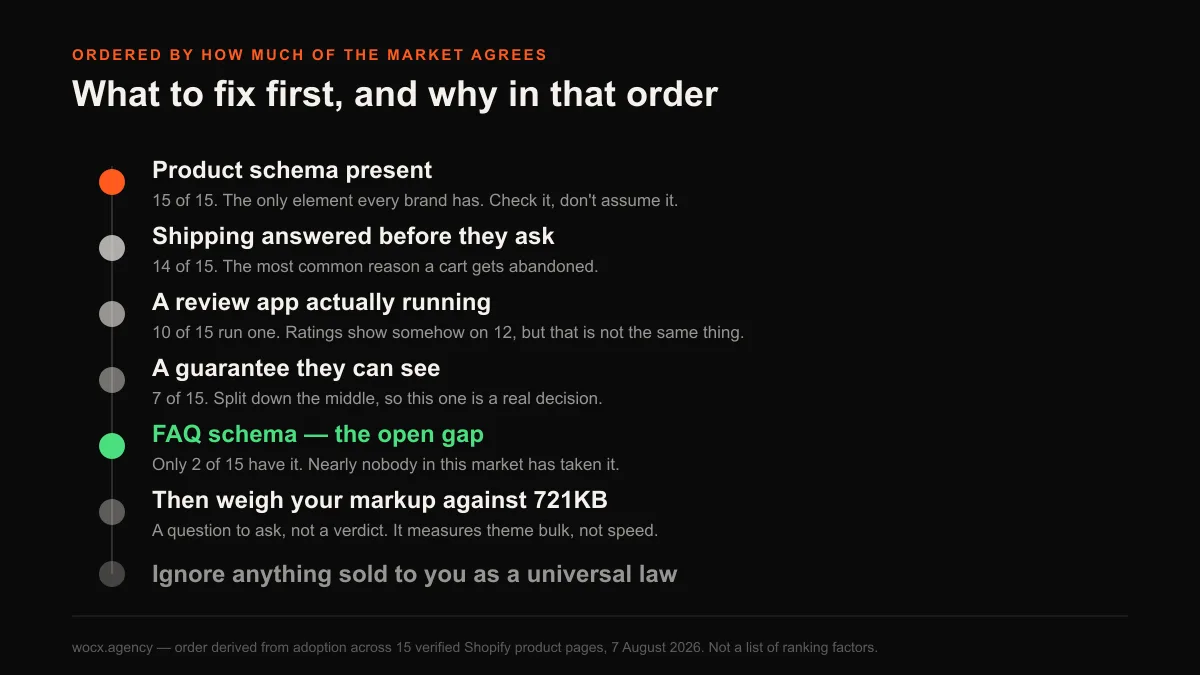
Check your Product schema exists. It should already be there, and every brand we measured has it. If yours does not, that is a build problem worth raising, because you are invisible in a way you cannot see.
Answer shipping before they ask. 14 of 15 brands put it on the page.
Get reviews running, if they are not. Two thirds of these brands run a review app. It is the strongest social signal available to you, and it is not the near-certainty most guides claim.
Add FAQ schema. 13 of 15 established brands have not, and the case grows every month that more buyers ask an assistant first.
Count your images. The middle of this market sits near sixty. One brand here sells well on seven, so this is a range rather than a rule, but if you are showing four you are below anything we measured.
Be sceptical about urgency, and about anyone who is certain. Four in five brands here decline to put scarcity language on the page. If you use it, use it because it is true.
None of this is a formula, and anyone selling you one is guessing. What it is, is a picture of what teams with real budgets have converged on, measured instead of assumed, with the parts we could not measure marked as such.
The four stores that dropped out, by name: Allbirds, whose product page would not respond, and Brooklinen, Ruggable and Spiritual Gangster, whose public pages offered us no product link to follow except a gift card. Naming them is the point. A study that silently discards what it cannot reach is quietly wrong, and the dropouts are rarely random: the slowest and most heavily protected sites are exactly the ones most likely to fall out, which biases whatever survives.
FAQ
What should a Shopify landing page include?
Based on 15 real brands measured in August 2026: Product schema was the only element on every page, free shipping messaging was on 14 of 15, and ratings visible in some form on 12 of 15, though only 10 of 15 run an actual review app. Below that, adoption drops off quickly, and nothing else reached even 55%. Most “essential” checklists you will read are far more confident than the market itself.
Do countdown timers and urgency work on Shopify?
Scarcity language appeared as page text on only 3 of 15 established brands. That figure is a floor, not a full count, because countdown timers are added by apps after the page loads and our method cannot see them. What it does show is that putting “only 4 left” in the page itself is free, and four in five of these brands have chosen not to.
How much markup should a Shopify product page have?
The median across 15 brands was 721KB of HTML, with the lightest quarter at or under 570KB and the heaviest at or above 1,216KB. Be careful what you conclude from it: this measures the markup your theme generates, not how fast the page loads, since images and scripts arrive separately.
How many images should a product page have?
The median was 57 across the 14 pages we could count, ranging from 7 to 245, and more than a third of these brands ship over a hundred. Most store owners run far fewer. The buyer cannot handle the product, so photography carries the sale. The constraint is proper sizing and lazy loading, not quantity.
Do most Shopify brands offer subscriptions?
No, and this is where we got our own first answer badly wrong. Shopify announces subscription support in nearly every store’s code whether or not anything is sold that way, which makes a naive count report about 80%. Checking for a subscription a customer could actually buy dropped it to 2 of 15.
Is FAQ schema worth adding?
It is the clearest open gap we found. Only 2 of 15 established brands had it, and unlike most of what we measured this count is completely reliable. It marks your questions and answers up so search engines and AI assistants can quote them directly, which matters more as buyers increasingly ask an assistant before searching.
Want to know how your own page compares to these 15? Send me the URL and I will run the same checks and tell you what is missing, including which answers the method genuinely cannot give you. Free, no obligation, usually a reply within the hour.