/Apps and tools
Best Shopify review apps: real prices and placement
July 28, 2026 · WOCX
The best Shopify review app for most stores is Judge.me, because it does the whole job at a price that does not grow as you do, but the app matters far less than where the reviews end up once you have them. A review widget at the foot of a product page is a review nobody reads. The same reviews beside the buy button answer doubt at the moment it stops a sale. So this covers what the apps actually cost, checked against the listings rather than repeated from other roundups, what the research does and does not prove, and the placement work that decides whether any of it converts.
Reviews earn their weight because they are the strongest social proof a product page carries, a stranger’s specific experience doing the convincing a brand cannot do for itself. Our trust-signals work keeps landing on the same finding. A review naming a real detail, the fit, the durability, the smell, outsells any amount of brand copy, and the app is only the machine that collects and displays them.
What the research actually shows, and what it does not
Nearly every article on this subject opens with the same number, that reviews lift conversion 270%, and almost none of them say where it comes from or how old it is. It comes from a 2017 study by Northwestern’s Spiegel Research Center with PowerReviews, which examined purchase data from 3 online retailers. The finding was that purchase likelihood for a product with 5 reviews was 270% higher than for the same product with none. The same study found the lift was 190% on lower-priced products and 380% on higher-priced ones, which fits the obvious mechanism: the more a mistake costs, the more a buyer wants evidence someone else survived it. That split is the practical takeaway for anyone deciding where to spend effort. If you sell a $20 accessory, reviews help. If you sell a $400 mattress or a $200 jacket, reviews are doing a much larger share of the selling, and a product page without them is asking for a leap of faith the buyer has no reason to make.
Two caveats matter more than the headline, and you will rarely see them attached to it. The data is from 2017 and covers 3 retailers, so treat it as directional rather than a number your store will reproduce. And the effect concentrates early. The study found the marginal benefit of each additional review drops off sharply after roughly the first 5, which reframes the whole job. Getting a product from 0 reviews to 5 is the work worth doing. Getting it from 200 to 400 is close to housekeeping.
The most useful finding in that study is the one almost nobody quotes. Purchase likelihood peaked in the 4.0 to 4.7 star range and started falling as ratings approached 5.0. A perfect score reads as filtered, and shoppers discount it. That single result should change how you handle bad reviews, and it is the opposite of what most stores instinctively do when a 3-star review lands.
There is a quiet joke in this. Judge.me currently sits at exactly 5.0 stars across 42,851 reviews on its own app listing, squarely in the range the research says buyers trust least.
What the apps actually cost
Most comparisons go stale here, so every figure below was checked directly against the Shopify app store listings on 4 August 2026 rather than repeated from another roundup. It matters, because the numbers in circulation are wrong. Several current articles list Loox as starting at $12.99 a month. Its cheapest paid tier is $49.99.
| App | Rating | Reviews on listing | Free plan | Entry paid plan |
|---|---|---|---|---|
| Judge.me | 5.0 | 42,851 | Unlimited reviews, photo and video, rich snippets | $15/mo flat |
| Loox | 4.9 | 8,851 | Yes, 17+ widgets, rich snippets | $49.99/mo, 300 orders |
| Yotpo | 4.8 | 4,392 | Up to 50 orders/mo | $15/mo Starter |
| Okendo | 4.9 | 1,311 | Up to 50 orders/mo | $19/mo, 200 orders |
Judge.me’s free tier is the outlier and the reason it is the default recommendation. Unlimited reviews, photo and video reviews, and Google rich snippets at zero cost is a genuinely complete product, not a trial with the useful parts removed. Loox also has a free tier now, which its reputation as the expensive option has not caught up with.
The cost nobody models: what happens when you win
Pricing pages are quoted at the tier a store starts on, which hides the thing that actually matters. Judge.me charges a flat fee. Loox, Yotpo and Okendo charge against order volume. Those two models diverge slowly at first and then violently, and the app that looked cheap at launch can be the most expensive line in your stack 2 years later.
| Monthly orders | Judge.me | Okendo | Loox |
|---|---|---|---|
| 100 | $0–15 (Free or Awesome) | $19 (Essential) | $0 or $49.99 (Convert) |
| 200 | $0–15 (Free or Awesome) | $19 (Essential) | $49.99 (Convert) |
| 1,500 | $15 (Awesome) | $119 (Growth) | ~$249.99 (Convert + blocks) |
| 3,500 | $15 (Awesome) | $299 (Power) | $299.99 (Unlimited) |
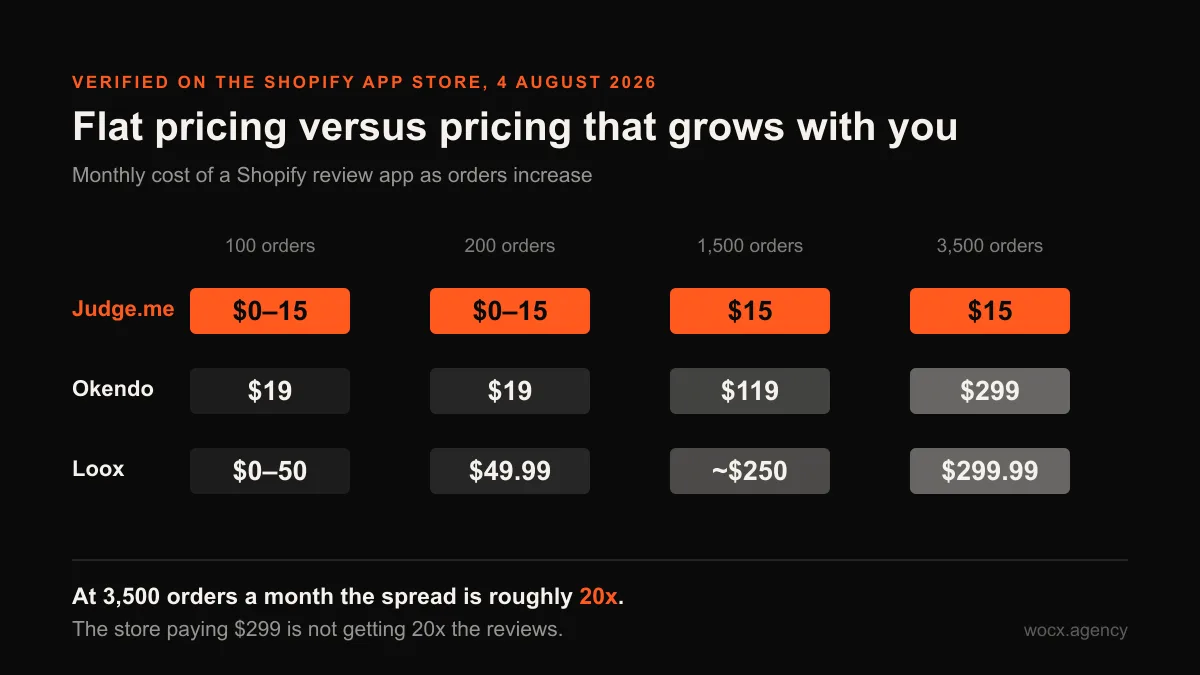
Two rows there need their working shown, because the arithmetic is not obvious and you should not have to take my word for it. Loox at 1,500 orders is the $49.99 Convert plan covering 300 orders plus 4 further 300-order blocks at $50 each, which comes to $249.99. Carry that same block pricing up to 3,500 orders and you would get $599.99, which is precisely why nobody pays it: at that volume you move to the Unlimited plan at $299.99 and stop counting blocks. Okendo works differently again, in bands rather than metered blocks, so 1,500 orders sits inside Growth at $119 and 3,500 sits inside Power at $299. Every tier name in that table appears on the app’s own listing, linked above, so each one is checkable in about a minute. At 3,500 orders a month the spread between the cheapest and dearest option here is roughly 20x, and the store paying $299 is not getting 20x the reviews. It is getting segmentation, attribution and retention tooling, which is worth real money to a brand running those programs and worth nothing to a store that only wants stars on a product page.
That is the actual decision. Not which app is best, but whether you will use the expensive parts. A store doing 3,500 orders a month on Judge.me is saving roughly $3,400 a year against Okendo’s Power tier, and that money buys the product photography the reviews sit beside, which will move conversion further than review segmentation ever will.
| Your store | The pick | Why |
|---|---|---|
| Small to mid, any category | Judge.me | Flat pricing, full free tier, stays light |
| Visual products, photo-led | Loox | Photo and video reviews shoppers trust |
| Larger brand running retention | Okendo | Attributes, segmentation, loyalty in one |
| Just starting, no budget | Judge.me free | Real reviews live at zero cost |
Placement is where reviews convert
Here is the part most stores get wrong, and it costs more than the app choice ever could. The default install drops a review section at the bottom of the product page, below the fold and below the description, where a shopper deciding at the buy button never scrolls. The reviews are there. They are just answering doubt in a room the buyer already left. On mobile, where most Shopify traffic now sits, the gap is worse again, because the description alone can run several screens before the review section appears at all. So a store can collect 400 genuine reviews, pay for the app that collected them, and still show a buyer nothing at the moment they are deciding. The reviews are not the problem in that store. The template is.
The fix is to bring the proof to the decision. Put the star rating and review count at the top beside the product title, so the first thing a shopper reads is that other people bought this and were glad. Then pull 2 or 3 specific written reviews up near the buy button, chosen because they name the objection that stops the sale, the one about sizing, the one about how it held up after a winter. The full review wall can stay at the foot for people who want to read 40 of them. The job at the buy box is done by 3 good ones placed deliberately. That placement is theme work, a small section reading the app’s review data and rendering it where it converts, rather than wherever the app dropped it on install.
This is also why the app choice is less consequential than it looks. Every app in the table above exposes its review data to the theme. What separates a product page that converts from one that does not is whether somebody moved that data to the buy box, and no app does that for you by default.
Getting the first 5 reviews on a new product
Since the research puts most of the gain in the first 5 reviews, a new product with none is the problem worth solving, and the automated request email cannot help you because nobody has bought it yet. What works is asking the customers you already have. A short personal email to buyers of your closest existing product, offering the new one at a real discount in exchange for an honest review, will usually produce the first handful inside 2 weeks.
Be careful how that is worded. Ask for an honest review, never a positive one, and do not make the discount conditional on the rating. Beyond the ethics, a batch of identical 5-star reviews arriving the same week is visible to shoppers and to the app’s own fraud checks, and you have just engineered the perfect score the research says buyers trust least.
Collecting reviews the honest way
An app collects reviews automatically, usually with an email a week or 2 after delivery, and that timing is right. Late enough that the buyer has used the thing, early enough that the experience is still sharp. The temptation is to sweeten it, and a small honest incentive, a few loyalty points or a modest discount on the next order, is fine and lifts response. What is not fine is paying for 5-star reviews or filtering out critical ones, because a wall of perfect scores reads as fake to the exact shoppers you are trying to convince.
Leave the honest 3 and 4-star reviews up. This is where the Spiegel finding stops being trivia and starts being money: ratings peaked in effectiveness between 4.0 and 4.7, so a product sitting at 4.6 with a few honest complaints is likely outperforming the same product polished to 5.0. The mixed reviews often do the converting, because they show a real store standing behind a real product. Respond to the critical ones in public, and a well-handled complaint sells better than a review that never happened.
FAQ
What is the best Shopify review app?
Judge.me for most stores, on flat pricing and a complete free tier. Loox if your products are visual and photo reviews carry the trust. Okendo for larger brands that will actually use segmentation and retention tooling. The app matters less than where you place the reviews it collects.
How much do Shopify review apps cost?
Checked on the app store on 4 August 2026: Judge.me is free or $15 a month flat, Loox is free or $49.99 for 300 orders, Yotpo starts at $15, Okendo at $19 for 200 orders. The important difference is that Judge.me is flat while the others scale with order volume, so at 3,500 orders a month the spread is roughly 20x.
Do reviews actually increase conversion?
The research supports it, with caveats. A 2017 Northwestern Spiegel study across 3 retailers found purchase likelihood 270% higher at 5 reviews than at none, with most of the gain arriving in those first 5. Treat it as directional. Placement matters as much as presence.
How many reviews does a product need?
Roughly 5 is where most of the measured effect lands, and the marginal benefit falls away sharply after that. Getting a product from 0 to 5 reviews is worth real effort. Getting it from 200 to 400 is housekeeping, not conversion work.
Should I delete bad reviews?
No, and the data argues against it. Purchase likelihood peaked between 4.0 and 4.7 stars and declined toward 5.0, because a perfect wall reads as filtered. Leave the honest 3 and 4-star reviews up and answer them in public.
Where should reviews go on a product page?
The star rating and count at the top by the title, 2 or 3 specific written reviews near the buy button, and the full wall at the foot for people who want it. That is a small theme section, not wherever the app installs itself by default.
Want your reviews placed where they actually convert, app to buy box? Send me the store and I will show you what your product page is burying. Free look, no obligation, usually a reply within the hour.